
According to industry benchmarks, small and medium businesses lost approximately $4,800 per hour in direct revenue during phone system outages. While searchers fear that ‘cheap’ means ‘unreliable,’ HAPBX shatters this assumption in 2026. We don’t just offer an affordable cloud PBX; we provide a high-availability global cluster infrastructure that ensures your business stays live when others go dark.
In 2026, that assumption is wrong. The smartest SMEs are choosing cloud platforms that deliver enterprise-grade security and scalability at a fraction of the cost of traditional hardware.
In this article, we analyzed the top providers based on price stability, dedicated infrastructure, and failover capabilities. We will prove you can have both cheap and bulletproof—and show why HAPBX changes the game with true high-availability global clustering and dedicated instances that beat most cheap hosted PBX providers on performance.
*This guide is published by HAPBX. While we feature our own solution, we strive to provide accurate technical comparisons of top industry contenders.
What Is a Hosted PBX? (and Why Cheap Doesn’t Mean Low-Quality)
A hosted PBX (also called cloud PBX, virtual PBX, or cloud phone system) is a complete business telephone solution that lives entirely in the cloud.
But what exactly is a cheap hosted PBX phone system? It is simply an enterprise-grade VoIP solution offered at a budget-friendly price point due to cloud efficiencies.
All the heavy lifting such as servers, switches, routing, updates, backups, and security is managed by the provider. Your team simply connects via softphones on laptops, mobile apps, or desk IP phones using the internet. Calls are carried over VoIP (Voice over Internet Protocol), giving you enterprise-grade features at a fraction of the cost of traditional on-premise systems.
Think of it as “PBX-as-a-Service”: you get unlimited extensions, IVR menus, call queues, voicemail-to-email, conference bridges, and analytics without ever touching a server or paying for electricity, cooling, or hardware refreshes every 3–5 years.
How a Modern Hosted PBX Works?
- Dedicated or Multi-Tenant Cloud Instances – Your PBX runs on isolated virtual environments (best case) or shared clusters.
- Global or Regional Data Centers – Calls are routed through low-latency paths, often with automatic failover.
- SIP Trunks – Replace expensive PRI/ISDN lines with internet-based trunks for unlimited inbound/outbound calling.
- Web-Based Admin Portal + Mobile Apps – Full control from any device, anywhere.
On-Premise vs Self-Hosted vs True Hosted PBX (Quick Comparison)
| Type | Hardware Required? | Maintenance | Typical Monthly Cost (50 users) | Uptime Reality |
| Traditional On-Premise | Yes (PBX box + PRI) | You or IT team | $2,000–$5,000+ (hardware + lines) | 95–98% (power, hardware failure common) |
| Self-Hosted (VitalPBX, FreePBX, 3CX on VPS) | VPS or server | You handle OS, updates, firewall | $150–$800 + your time | 97–99% if you’re good, drops fast if neglected |
| True Hosted/Cloud PBX (HAPBX, RingCentral, etc.) | None | Provider | $500–$1,500 | 99.99%+ with real clustering |
Why “Cheap Hosted PBX” Is No Longer a Red Flag in 2026?
Five years ago, a cheap hosted PBX usually meant:
- Shared servers with noisy neighbors
- No real redundancy
- Frequent outages during peak hours
- Weak security (open SIP ports, no DDoS mitigation)
Today, advancements in cloud infrastructure have flipped the script. Providers can now deploy dedicated isolated instances on global clusters at a cost lower than most companies spend on electricity for an on-premise PBX.
The result? You can find a cheap hosted PBX for $10–$20 per user/month (or even flat-rate unlimited like HAPBX) and still get:
- 99.999% uptime SLAs
- Automatic geo-redundant failover
- Enterprise-grade TLS/SRTP encryption
- DDoS protection that stops attacks measured in terabits
- Latency under 50 ms worldwide
Cheap hosted PBX no longer equals low-quality — it equals smarter architecture. The providers who still charge $40–$80 per user are often banking on old fears rather than delivering superior technology.
In the next section, we’ll show exactly why thousands of businesses are finally ditching the self-hosted headache for good.
Key Benefits of Affordable Cloud PBX Systems
By 2026, the gap between “cheap” and “enterprise-grade” has disappeared. Modern providers now deliver features and reliability that self-hosted systems can only dream of—at a lower total cost.
Here are the 6 advantages that make cheap hosted PBX phone system the default choice:
- True high availability: Unlike single VPS setups, modern cloud platforms use multi-region clusters with automatic failover to instantly reroute calls if a data center fails.
- Unlimited scalability: Add 10 or 1,000 extensions instantly without per-user licensing traps. Leading systems handle 100+ concurrent calls on base plans.
- Built-in enterprise security: TLS/SRTP encryption and terabit-level DDoS mitigation come standard, shielding you from attacks and “noisy neighbor” risks.
- Global low latency: Regional data centers keep domestic ping under 50ms and global latency below 150ms—ensuring crystal-clear voice quality.
- Zero maintenance: No more hardware refreshes, OS patches, or weekend updates. Your IT team can stop firefighting and focus on revenue.
- Advanced features included: IVR, call queues, voicemail-to-email, and analytics are often included in the flat rate, not sold as expensive add-on modules.
A cheap cloud PBX isn’t a compromise — it’s the smarter, safer, and more powerful option.
The only question left is which provider actually delivers on these promises without hidden limits or shared-hosting compromises.
Top 6 Cheap Hosted PBX Providers Compared (2026)
We didn’t just look at the price tag. We analyzed the value of the dollar. In the world of cheap cloud PBX, a $10 plan that lacks call recording or charges for every minute isn’t actually cheap—it’s a trap.
Below, we break down the top providers based on Real Total Cost of Ownership (TCO), uptime architecture, and feature density.
1. HAPBX
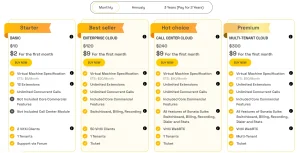
HAPBX pricing
Best For: SMEs & Call Centers Demanding 100% Uptime
Starting Price: $10/month (Basic) – HOT DEAL: Experience Premium Enterprise Plans for just $9!
HAPBX bridges the gap between budget providers and premium enterprise carriers. While the entry-level plan starts at $10/month, HAPBX is currently running a massive promotion allowing businesses to experience the most advanced Enterprise & Call Center features for just $9 (first month). This lets you test the full power of the Sonata Suite, dedicated infrastructure, and unlimited extensions without a heavy upfront commitment.
Unlike competitors that put budget accounts on crowded shared servers, HAPBX provides dedicated instances even at the entry level. This architecture ensures that your voice quality is never affected by another company’s usage spikes (“noisy neighbors”).
- Pros:
- True High Availability: Built on a global, geo-distributed cluster infrastructure. If one data center goes offline, calls are instantly rerouted to another active node. This ensures continuous uptime and uninterrupted communication.
This means your business never suffers from downtime-related losses, keeping sales, support, and operations fully reachable even during unexpected incidents.
-
- Unlimited Scalability:
- Unlimited extensions
- 100+ concurrent calls
- IVR Availability: Basic Plan is limited to 1 IVR level; ; Premium Plans (available via the $9 trial) support unlimited IVR levels and full commercial features.
- No limits on scaling operations, teams, or call center workloads. Perfect for fast-growing enterprises that refuse to outgrow their PBX.
- Unlimited Scalability:
-
- Security First: HAPBX includes enterprise-grade protection as a standard, not an upsell:
-
-
- Advanced DDoS mitigation
- End-to-end TLS/SRTP encryption
- Isolated Dedicated Instance ensures traffic and data are never shared.
- Businesses gain maximum data privacy and protection against SIP attacks and data leaks, ensuring compliance and peace of mind without hidden security fees.
-
- Cons (Be Honest):
Setup time: While managed, the onboarding is thorough to ensure security, meaning it takes 24 hours rather than 5 minutes to go live.
If your business loses money when the phones stop ringing, HAPBX offers the highest reliability-to-price ratio in 2026, especially with the $9 premium experience offer.
2. Zoom Phone
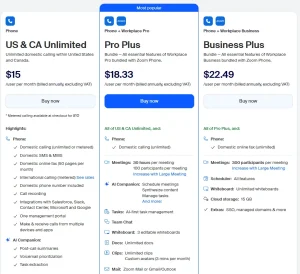
Zoom phone pricing
Best For: Video-First Remote Teams
Starting Price: $8-$22/user/month
If your team already lives inside Zoom meetings 8 hours a day, Zoom Phone is a logical add-on. It unifies video and voice into a single pane of glass, making it incredibly easy for remote employees to adopt.
- Pros:
- User Experience: Slick, modern app that users already know how to use.
- Video Integration: Elevate a phone call to a video meeting with one click.
- Cons:
- Hidden Costs: The $8 plan provides limited domestic calling. It will charge more for outbound calls. The “real” business plan is closer to $10-20 once you add necessary features.
- Support: As a massive global giant, getting personalized support for a 20-person account can be difficult.
Zoom Phone is excellent for internal teams who rarely use desk phones; less ideal for heavy outbound sales teams on a cheap hosted PBX.
3. Phone.com
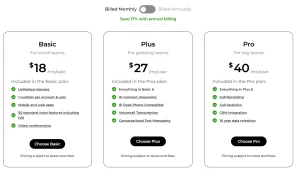
Phone.com pricing
Best For: Very Low Volume / Pay-As-You-Go
Starting Price: $18-$27/user/month
Phone.com is a veteran in the budget space. They shine for businesses that need a professional face (IVR, greeting) but actually make very few calls. Their “mix and match” user model allows you to put light users on cheap metered plans and heavy users on unlimited ones.
- Pros:
- Flexibility: You don’t have to buy an unlimited plan for a receptionist who answers 2 calls a day.
- HIPAA Compliance: Available on higher-tier plans.
- Cons:
- Minute Caps: Their entry-level pricing usually includes a bucket of minutes (e.g., 300 min). Overage fees can pile up fast if you grow.
- Interface: The backend portal feels slightly dated compared to modern 2026 standards.
Phone.com is perfect for a doctor’s office or seasonal business with low call traffic.
4. 3CX (Hosted)
Best For: IT-Heavy Teams & DIY Enthusiasts
Starting Price: Free (Self-Managed) / ~$15-20 (Hosted)
3CX is a powerhouse for those who want control. Originally a software-only solution, they now offer hosted versions. It is feature-rich and supports almost any SIP phone hardware in existence.
- Pros:
- Feature Depth: Extremely granular control over routing, queues, and rights.
- Pricing Model: They charge by “Simultaneous Call” rather than per user, which can be a steal for large companies with low phone usage.
- Cons:
- Complexity: This is not a “set and forget” system. You or your IT person will need to configure firewalls, SIP trunks (often bought separately), and provisioning.
- Support: Direct support from 3CX is limited; you mostly rely on their (excellent) forum community or a local reseller partner.
3CX is great if you have a skilled IT manager on payroll. Risky if you don’t know what a “SIP header” is.
5. Grasshopper
Grasshopper pricing
Best For: Solopreneurs & Side Hustles
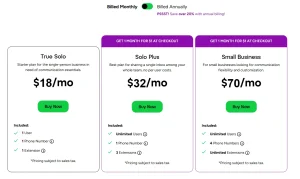
Starting Price: $18/month (1 number, 1 extension)
Grasshopper isn’t technically a “PBX” in the traditional sense—it’s a virtual inbox layer on top of your personal cell phone. It’s designed to keep your business calls separate from your personal calls without buying hardware.
- Pros:
- Simplicity: Easiest setup on this list. No hardware to configure.
- Flat Rate: Pricing is based on numbers, not users, which is great for small partnerships.
- Cons:
- No Desk Phones: You generally cannot connect a physical SIP phone. It’s mobile/softphone only.
- Limited Growth: Once you hire employees who need call transfers, queues, or warm handoffs, you will hit a wall and have to migrate.
Grasshopper is the winner for freelancers and realtors. Not recommended for offices with 3+ staff members.
6. Ooma Phone System
Best For: Traditional Small Offices (Retail/Shop)
Starting Price: $19.95/user/month
Ooma targets the “non-technical” business owner—think auto shops, bakeries, and retail stores. Their strength is simplicity and hardware that works out of the box.
- Pros:
- Plug-and-Play: Their hardware is pre-configured. You plug it into the internet, and it works.
- Key Features Included: Virtual receptionist and ring groups come standard.
- Cons:
- Price Creep: At $19.95, it is on the higher end of “cheap.”
- Feature Gates: Want call recording or voicemail transcription? You’ll need the Pro plan ($24.95+), pushing it out of the budget category.
Ooma is a solid, user-friendly choice if you value physical hardware over advanced software features.
Comparison Matrix: What Do You Get for $15 in 2026?
To prove that price isn’t everything, here is a breakdown of what a $15/user budget actually buys you with the top 3 contenders.
| Feature | HAPBX | Zoom Phone (Pro) | Grasshopper |
| User Type | Unlimited Extensions | Metered / Single User | Virtual Extensions |
| Concurrent Calls | 100+ (High Capacity) | Limited by Plan | Shared |
| Architecture | Dedicated Instance | Shared Multi-Tenant | Shared |
| Desk Phone Support | Yes (Any SIP Brand) | Yes (Certified Models) | No |
| Call Recording | Included | Add-on / Higher Tier | Add-on |
| Uptime SLA | 99.999% | 99.9% | 99.9% |
If you need a simple app for video meetings, choose Zoom.
If you are a freelancer, choose Grasshopper.
But if you need a dedicated, enterprise-grade phone system that scales without hidden fees, HAPBX wins on TCO (Total Cost of Ownership) because we replace the ‘Per-User Tax’ with a flat-rate infrastructure model. While others limit your growth with seat-based pricing, HAPBX supports unlimited extensions and 100+ concurrent calls on our global failover network.
Why HAPBX Is the Best-Value Cheap Cloud PBX?
Most providers of cheap hosted PBX cut costs by cramming thousands of customers onto a single shared server. It works fine until one customer gets a DDoS attack or runs a massive call campaign—then everyone suffers lag and jitter.
HAPBX takes a different approach. We are the only provider in this price bracket that prioritizes Architecture over Density.
1. The “Noisy Neighbor” Solution (Dedicated Instances)
While most budget providers run hundreds or thousands of tenants in one shared environment, HAPBX provides an isolated Dedicated Instance for every customer, even at the entry tier.
This ensures:
- Voice traffic is completely separated from other companies
- External traffic spikes never affect your PBX
- Call quality remains stable—consistently under ~50 ms latency in normal conditions
- Security incidents (like DDoS) remain contained within the affected tenant
This level of isolation is typically found in enterprise-grade telecom systems, not budget-hosted PBX platforms.
Business impact:
Your teams get predictable call quality during peak hours, marketing campaigns, and high-traffic periods—ensuring no lost opportunities or degraded customer experience.
2. True Global Clustering (Not Just a VPS)
Self-hosted PBX setups—such as running 3CX on AWS or on a local server—depend entirely on a single machine. If that server reboots, crashes, or loses its network link, your entire phone system goes offline immediately.
HAPBX operates on a geo-distributed global cluster, meaning your PBX runs simultaneously across multiple data centers instead of one. If one region becomes unavailable, the system automatically shifts traffic to another active node within the same cluster.
For example, if the Singapore node experiences an outage, traffic is seamlessly rerouted to another APAC cluster node—such as Tokyo or Sydney—without dropping ongoing calls. This multi-region failover architecture is designed to deliver 99.999% uptime, a resiliency level typically associated with Tier-1 telecom carriers.
Business impact:
You avoid costly downtime, missed leads, support disruptions, and operational slowdowns—common issues with single-server PBX deployments.
3. Pricing That Delivers Real Value (No Hidden Fees)
Unlike traditional models that charge “per user,” HAPBX focuses on a transparent subscription model. For example, the Enterprise Cloud plan costs $1,200/year (plus a small infrastructure fee), supporting unlimited extensions.
There are zero surprise fees. You won’t find “add-on creep” for essential features like call recording, billing tools, or switchboards. When factoring in the elimination of IT maintenance hours and downtime losses, the total cost of ownership (TCO) is 30–50% lower than self-hosted or “per-user” competitors.
How to Choose the Right Low-Cost Hosted PBX?
Picking a cheap cloud PBX that won’t fail you in six months is straightforward if you follow this proven 7-step framework. Thousands of SMEs use it to avoid buyer’s remorse and hidden costs.
Step 1: Define Your Must-Have Requirements
List your non-negotiables first:
- Number of users today + expected growth in 12–24 months
- Concurrent calls during peak hours (e.g., 20 for a 50-seat office, 80+ for call centers)
- Required features (IVR, call recording, queues, SMS, Teams integration)
- Geographic needs (domestic only vs. international low-latency).
Skip this step and you’ll overpay or outgrow the plan fast.
Step 2: Verify Architecture (Dedicated Instance & High Availability)
Don’t let “cheap” mean “shared.” Most budget providers cut costs by crowding thousands of users onto single servers, creating “noisy neighbor” latency and security risks.
Ask your provider explicitly: “Do I get a dedicated isolated instance, and does it auto-failover if a data center crashes?”
Demand proof of multi-region clustering (like HAPBX’s setup) rather than just a marketing SLA. True high availability means your calls survive even if an entire continent loses power—something impossible on shared hosting.
Step 3: Test Call Quality & Latency Yourself
Schedule demos during your busiest hour. Make test calls from:
- Office desktop softphone
- Mobile app on 4G/5G
- Remote locations (VPN if needed)
Accept nothing over 150 ms round-trip. HAPBX consistently delivers 40–70 ms domestically.
Step 4: Calculate 24-Month Total Cost of Ownership
Look beyond the monthly user fee. Include:
- Base price + taxes/fees (USF, E911)
- Essential add-ons (AI, extra minutes, SMS)
- Migration support costs
- IT time saved (priceless for self-hosted refugees)
Step 5: Check Migration Path & Support Reality
Ask:
- Is there free assisted migration from VitalPBX/FreePBX/3CX?
- Is support 24/7 via phone, or just email tickets?
- What is the average first-response time? (Under 15 minutes is gold).
HAPBX provides white-glove migration and direct engineer access—critical when you’re moving 200 extensions.
Step 6: Start Small, Scale Confidently
Choose a provider with a risk-free trial or money-back guarantee. Test with 5–10 users first, then roll out company-wide once the system proves its stability.
Follow these seven steps and you’ll land on a low-cost hosted PBX that actually saves money, time, and sanity for years—not just the first invoice.
FAQs on Cheap Hosted PBX
1. What is the cheapest reliable hosted PBX right now?
For businesses with 30–100+ users, HAPBX Enterprise Cloud is the best value, costing approximately 120$/month all (100$ for the annual subscription broken down monthly + $20 infrastructure fee). This includes unlimited extensions, the full Sonata Suite, a dedicated instance, and 99.999% uptime. It eliminates the “per-user” tax that often costs companies $1,000+ per month elsewhere.
2. Is a “cheap” cloud phone system actually secure?
It depends on the architecture. If a cheap provider puts all customers on a single shared server, a DDoS attack on one customer can affect everyone.
To ensure security at a low price point, look for providers that offer dedicated isolated instances and built-in TLS/SRTP encryption. This ensures your voice data is encrypted and your system is shielded from “noisy neighbors,” a standard feature on HAPBX Enterprise Cloud.
3. What are the “hidden fees” I should watch out for?
When comparing quotes for a cheap hosted PBX, always ask about these three non-advertised costs:
- Regulatory fees: Universal Service Fund (USF) and E911 fees are mandatory and added to the final bill.
- Feature add-ons: Many providers charge extra for “Premium” features like call recording, voicemail-to-email, or detailed analytics.
- Number porting: Some budget carriers charge a one-time fee to move your existing numbers over.
4. Will I lose money if I switch from a self-hosted system to a hosted solution?
While self-hosted software is “free,” the infrastructure is not. Most businesses find that when they add up the cost of VPS hosting, SIP trunking minutes, security firewall licenses, and—most importantly—IT maintenance hours, a hosted solution is roughly 30–50% cheaper annually.
Hosted PBX eliminates the “hidden payroll cost” of having an IT staff member constantly patching and updating a Linux server.
5. Do cheap hosted PBX systems work well for call centers?
Yes — HAPBX Call Center Cloud includes the full Sonata Suite (switchboard, dialer, real-time stats, AI sentiment analysis) at a fraction of RingCentral or Five9 pricing.
6. Can I keep my existing phone numbers?
100% yes. All reputable cheap hosted PBX providers (including HAPBX) handle local, toll-free, and international number porting at no extra charge.
7. Do I still need physical desk phones?
No. Most teams run entirely on softphones (Windows/Mac/Linux), mobile apps, or WebRTC browsers. You can add SIP desk phones later if you want.
8. What happens if my internet goes down?
On a true cloud system, your PBX is hosted in a data center, not your office. This means the system stays online even if your building has no power.
Providers like HAPBX allow you to configure automatic failover: if your IP phones go offline, calls can instantly forward to a mobile app or an external cell number, ensuring you never miss a client call during an outage.
Conclusion: Your Business Deserves Communication That Never Fails
You started this guide looking for a cheap hosted PBX. But by now, one truth is clear: the cheapest system isn’t just the one with the lowest monthly fee.
The cheapest system is the one that never goes down, never surprises you with hidden fees, and never wastes your IT team’s time fixing outages.
That system exists today.
While other providers rely on shared hosting to cut costs, HAPBX was built differently.
Engineered by experts tired of watching businesses lose money on “budget” platforms, we run every customer on dedicated, globally clustered infrastructure—the same architecture enterprises pay millions for—but priced for the SME budget.
No shared servers. No per-user traps. No “sorry, that’s an extra fee” conversations.
Just unlimited extensions, 99.999% uptime, and a team that handles the tech so you can focus on revenue.
Ready to stop overpaying for downtime?
→ Book your free demo and let HAPBX calculate exactly how much you’ll save in your first year.