
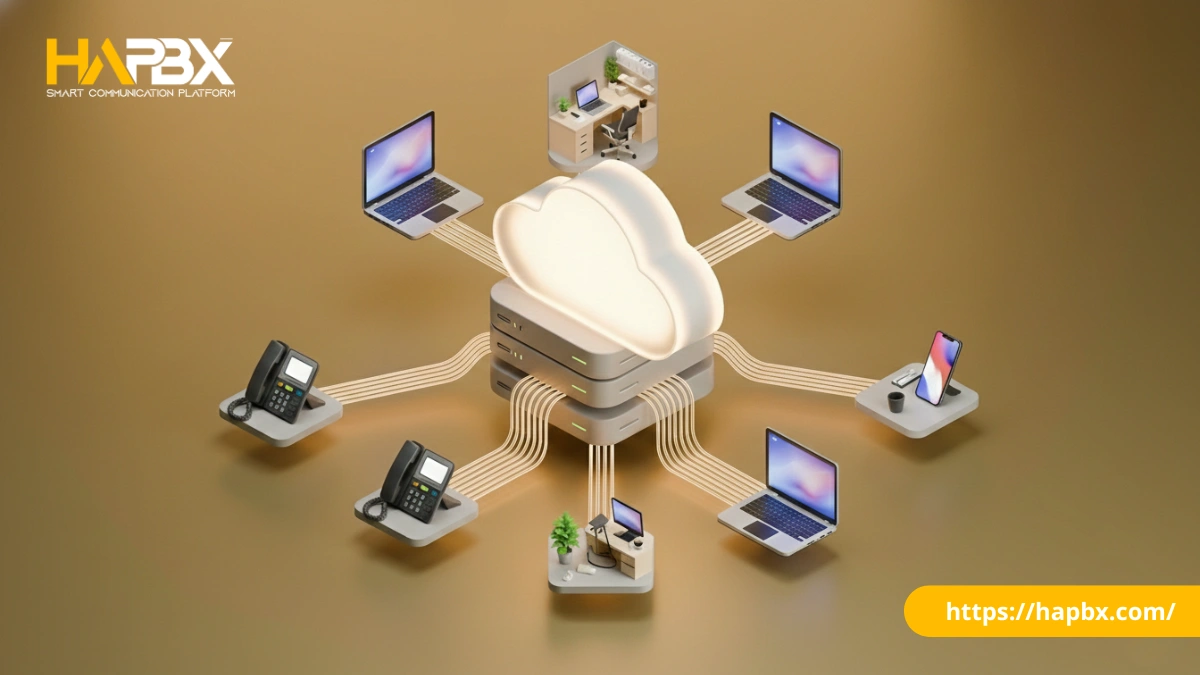
A missed call isn’t just a missed connection, it is a missed revenue opportunity. Today, many businesses still bleed budget by managing individual phone lines for every employee. This fragmented approach creates operational chaos and inflated bills.
The solution lies in centralizing your communication infrastructure. A PBX phone system acts as the backbone of modern business telephony, transforming how your team connects with customers and each other.
In this guide, we will cover everything from the technical architecture to the financial benefits of deploying a PBX, ensuring you make an informed decision for your organization.
What is a PBX Phone System?
A PBX phone system (Private Branch Exchange) is a private telephone network used within a company that allows users to communicate internally and externally with the outside world.
While the term “Exchange” sounds technical, the business concept is simple: it is an intelligent switchboard. Instead of purchasing a separate commercial phone line for every desk in your office, a PBX connects all your internal phones to a smaller pool of external lines.
PBX Definition and Core Concept
At its core, a PBX acts as a traffic controller for voice data. It manages the flow of calls between your internal team (extensions) and the Public Switched Telephone Network (PSTN) or VoIP providers.
The first PBX systems required human operators physically connecting wires on massive switchboards. By the 1960s, automated switches handled routing. Today, cloud-based platforms use software to deliver capabilities instantly.
By creating a private network, a PBX allows employees to talk to each other indefinitely without incurring a single cent in carrier charges.
PBX vs. Traditional Phone Lines
To understand the value of a PBX phone system, let’s compare it to a standard home phone setup.
In a traditional setup, if you have 50 employees, you pay for 50 separate phone lines. If 40 of those employees are not on the phone, you are paying for idle capacity.
A PBX changes this math through line sharing. It relies on the statistical fact that not everyone in your company makes an outside call simultaneously.
Think of a PBX like an internet router.
- Without a router: Every laptop needs its own modem and paid internet subscription.
- With a router (PBX): One internet connection supports 20 laptops sharing the bandwidth.
The same principle applies to your business phone system—maximize usage, minimize waste.
How Does a PBX Phone System Work?
A PBX phone system operates as a sophisticated call management hub, handling three distinct traffic patterns: incoming calls, internal communications, and outgoing connections.
The Call Flow Process
Incoming Calls:
When a customer dials your main business number, the call hits your PBX first—not an individual phone. The system then:
- Checks time-based routing rules (business hours vs. after-hours)
- Presents an auto-attendant menu (“Press 1 for Sales…”)
- Routes to the appropriate queue or extension
- Sends to voicemail if unanswered
Internal Communications:
When an employee dials extension 205, the PBX phone system routes this call entirely within your private network. Zero external lines used. Zero carrier charges. This is where businesses save thousands monthly on inter-office communication.
Outgoing Calls:
When a user dials an external number (like a customer), the PBX:
- Detects it’s not an internal extension
- Selects an available trunk line from your pool
- Establishes the connection through your carrier
- Logs the call for billing and analytics
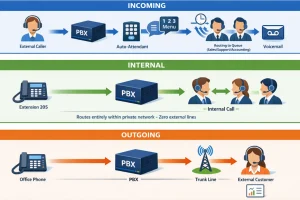
PBX Phone System Call Flow Diagram
Essential PBX Components
Every PBX phone system consists of 4 critical elements:
- The Control Center (Brain)
Either a physical server in your closet (on-premise) or cloud-based software managed by a provider like HAPBX. This handles all routing logic and feature execution. - Network Connectivity (Veins)
Traditional systems use physical phone lines; modern systems use SIP trunks—virtual lines that carry voice over your internet connection at a fraction of the cost. - End Devices (Hands)
What your team actually uses: IP desk phones, softphones on computers, or mobile apps. Modern PBX phone systems support all three simultaneously. - Management Interface (Control Panel)
A web portal where administrators configure routing rules, add users, monitor call quality, and pull analytics—all without touching physical hardware.
Types of PBX Phone Systems
Choosing the right PBX architecture is the most critical infrastructure decision you will make. While the end result—a phone ringing—is the same, the underlying technology impacts your budget, maintenance, and scalability.
Traditional / Legacy PBX (Analog)
This is the “old school” landline system found in established office buildings. It relies on physical copper wiring and a proprietary hardware box installed in your server closet.
- Pros: Extremely stable; does not require an internet connection to operate.
- Cons: High maintenance costs; adding a new line requires a technician to physically rewire connections; lacks modern features like mobile apps.
- Best for: Factories or hotels with existing copper infrastructure and unreliable internet access.
IP PBX (On-Premise)
An IP PBX modernizes the legacy concept by using internet protocols (VoIP) for voice data, but you still own and host the hardware on-site.
- Pros: You maintain total control over your data and security; lower monthly subscription fees since you own the equipment.
- Cons: Requires a significant upfront capital expenditure (CapEx) for servers; your internal IT team must handle all updates and security patches.
- Best for: Large enterprises (500+ users) with strict data sovereignty requirements and a dedicated IT staff.
Hosted / Cloud PBX (The Modern Standard)
Cloud PBX is currently the dominant choice for 80% of new business deployments. In this model, the service provider hosts the entire phone system in off-site data centers. You simply plug IP phones into your internet connection.
- Pros:
- Zero Hardware: No servers to buy or maintain.
- Immediate Scalability: Add or remove users in seconds via a web portal.
- OpEx Model: Predictable monthly per-user pricing.
- Cons: Voice quality depends entirely on your internet stability. However, reputable providers like HAPBX address this with redundant infrastructure, guaranteed uptime SLAs, and enterprise-grade failover systems.
- Best for: Small to mid-sized businesses (SMBs) and remote teams needing flexibility.
Hybrid PBX
A hybrid system connects legacy analog lines to a modern digital network. It serves as a bridge, allowing businesses to slowly migrate to VoIP without scrapping their expensive existing hardware immediately.
| Feature | Traditional Analog | On-Premise IP PBX | Hosted / Cloud PBX |
| Upfront Cost | High (Hardware + Wiring) | High (Server Hardware) | Low (Phones only) |
| Maintenance | Specialist Technician | Internal IT Team | Vendor Managed |
| Scalability | Difficult (Physical limits) | Moderate (Server limits) | Unlimited |
| Best For | Locations w/o Internet | High-Security Enterprise | Most Businesses |
Essential PBX Phone System Features
A modern PBX phone system is more than just a telephone switch—it’s a comprehensive software platform designed to optimize your organization’s workflow.
Core Communication Features
These are the foundational tools that drive efficiency across every professional environment:
- Intelligent Call Routing (Find Me/Follow Me): The system ensures you never miss a critical lead. If your desk phone rings unanswered, the PBX automatically forwards the call to your mobile app, then to a colleague, ensuring the caller actually speaks to a human.
- Auto-Attendant (IVR): This serves as your company’s “digital front door.” It replaces the need for a full-time receptionist by greeting callers and offering menu options (“Press 1 for Billing, Press 2 for Support”).
- Voicemail-to-Email: Modern PBX systems send voicemail audio files or transcribed text directly to your email inbox. This allows you to prioritize urgent messages and archive records for compliance.
- Audio Conferencing: Instead of paying for third-party conference bridges, PBX systems allow you to host secure internal or external conference calls with a dedicated dial-in number.
Advanced Business Features
These integrated tools transform your phone system into a productivity engine:
- CRM Integration (Screen Pops): When a client calls, the PBX syncs with your CRM to display the caller’s profile on your screen before you answer—invaluable for sales and support teams.
- Analytics & Reporting: You cannot improve what you do not measure. Dashboards help provide real-time data on Average Wait Time, Call Volume by Hour, and Missed Call Rates.
- Mobile & Desktop Apps: Employees can install a “softphone” on their devices, making calls showing the business number (protecting their private mobile number) from anywhere in the world.
- Video Conferencing: Many PBX phone systems now include HD video meetings and screen sharing, reducing the need for separate subscriptions.
Call Center Capabilities
Even if you aren’t a formal call center, features like call queues (holding callers in line with music) and skills-based routing (sending Spanish speakers to Spanish-speaking agents) prevent customer frustration during high-volume periods.
Key Benefits of PBX Systems for Businesses
Why should you invest in a specialized PBX phone system rather than just using mobile phones or standard landlines? The ROI comes from cost control, brand perception, and operational agility.
1. Significant Cost Savings
Switching to a modern PBX, specifically one utilizing VoIP technology, drastically reduces your monthly overhead.
- Line Consolidation: You no longer pay for 50 unused lines; you pay only for the “trunks” you need.
- Internal Communication: Calls between your London and New York offices become free internal extension calls, eliminating long-distance charges.
- Data Point: Businesses switching to Cloud PBX solution like HAPBX typically realize a 30–50% reduction in Total Cost of Ownership (TCO).
2. Professional Business Image
A PBX phone system levels the playing field. A two-person startup can sound just as professional as a Fortune 500 company.
- Consistency: Every caller hears the same high-quality greeting and holds music.
- Structure: Routing calls to specific departments (even if they are all answered by the same person) builds trust and implies organizational maturity.
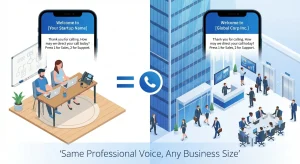
PBX systems level the playing field – startups sound as professional as Fortune 500 companies
3. Scalability and Flexibility
In the past, adding a new employee meant waiting weeks for the phone company to install a wire.
- Instant Provisioning: With cloud PBX, you can add a new user in the admin portal, ship them a phone (or have them download the app), and they are live in minutes.
- Remote Work: Your phone system lives in the cloud, not the office basement. If a snowstorm hits, your team works from home using the exact same business numbers.
4. Enhanced Productivity
Unified Communication (UC) features streamline daily tasks. Instead of toggling between a desk phone, a mobile, and a fax machine, employees manage all communication from a single interface. This integration removes friction, allowing staff to focus on high-value work rather than managing hardware.
Who Needs a PBX Phone System?
While PBX systems were once exclusive to major corporations, the rise of cloud technology has made this tool essential for businesses of every stage.
- Small Businesses & Startups: If you have more than 3 employees, relying on personal mobiles looks unprofessional. A Cloud PBX gives you a main business line and auto-attendant (“Press 1 for Sales”) instantly, creating a corporate image without hardware costs.
- Mid-Sized Companies: As teams grow across departments or multiple locations, you need internal extension dialing to eliminate friction. A PBX unifies disjointed offices into a single network, allowing free inter-office communication.
- Large Enterprises & Specialized Industries:
- Healthcare & Law: Require call recording and strict privacy compliance.
- Retail & Hospitality: Need complex ring groups and reliable wake-up call scheduling.
- Call Centers: Depend on real-time analytics and skills-based routing to manage high volumes.
If your organization values professional image, cost control, and workflow efficiency, you have outgrown standard phone lines and are ready for a PBX.
PBX vs. Other Phone Systems Explained
The telecommunications industry is filled with acronyms that often confuse buyers. To make the right choice, you must distinguish the system (PBX) from the technology (VoIP) and the service model (UCaaS).
PBX vs. VoIP
The most common question business owners ask is: “Do I need a PBX or VoIP?” The answer is: You usually need both. VoIP (Voice over IP) is the method of transmitting voice over the internet, while PBX is the hardware or software that routes those calls.
Modern systems are IP PBX systems that use VoIP technology to function.. You rarely choose between them; they work together to deliver clear, digital voice service.
PBX vs. Key Systems
Key Systems are the predecessors to the PBX, often found in very small, older offices. Key System requires users to manually select specific lines (e.g., “Line 1”) to make a call, while PBX automatically selects an open line from a pool.
PBX vs. UCaaS
Unified Communications as a Service (UCaaS) represents the next evolution beyond traditional PBX.
While a standard PBX focuses on voice calling, UCaaS platforms combine voice calling with video meetings, chat, and file sharing in one app. If you need more than just voice, a UCaaS platform is the superior choice.
How to Choose the Right PBX Solution?
Selecting a PBX vendor isn’t just an IT decision—it’s a long-term business strategy. Evaluate your options using these critical criteria.
Key Evaluation Criteria
- Budget Structure: Do you prefer a large upfront capital expenditure (CapEx) to own the equipment, or a predictable monthly operating expense (OpEx)?
- Company Size & Scalability: If you plan to hire 10 new staff next year, ensure the system allows you to add users instantly without buying new server licenses.
- Internet Reliability: For Cloud/VoIP solutions, your voice quality is only as good as your internet connection. If your office has poor bandwidth, a Hybrid or On-Premise system may be safer.
- Feature Requirements: Don’t pay for features you won’t use. Ensure non-negotiables like CRM Integration or Call Recording are included in the base price.
- Support Service Level: When phones go down, business stops. Look for vendors offering 24/7 support with a guaranteed response time (SLA).
Cloud vs. On-Premise Decision Guide
- Choose Cloud PBX if: You want low upfront costs, have a distributed/remote team, and prefer outsourcing maintenance to the vendor. This is the standard for 90% of modern SMBs.
- Choose On-Premise PBX if: You are a large enterprise (500+ users), have strict data sovereignty regulations (e.g., government), or operate in a facility with unreliable internet access.
Questions to Ask Vendors
Before signing, ask these hard questions:
- What is your guaranteed uptime SLA?
- Is support based in-country or outsourced?
- How do you handle number porting (keeping my current phone numbers)?
- Are there hidden fees for “setup” or “training”?
- Does the system support high-availability failover if a server crashes?
Why HAPBX is the Preferred Choice for Modern Business
While many providers offer standard Cloud PBX features, HAPBX (High Available Private Branch Exchange) distinguishes itself by solving the industry’s biggest pain points: downtime risks and “noisy neighbor” performance issues.
Built by engineers obsessed with reliability, HAPBX is not just a phone system—it is a Business Continuity Platform.
- Dedicated Instance Infrastructure: Unlike standard cloud PBX providers that put multiple customers on a shared server (leading to security risks and performance fluctuations), HAPBX operates on Dedicated Isolated Cloud Instances. This ensures your voice data is physically segregated, guaranteeing enterprise-level stability and security.
- True High Availability (HA): HAPBX runs on a Global Cluster Infrastructure. This active-active architecture means your system is mirrored across multiple zones. If one node encounters an issue, the system instantly fails over to another without disrupting your calls.
- Transparent Pricing: Most Cloud PBX providers penalize your growth by charging per user. HAPBX is different. We offer unlimited extensions with no per-seat fees—you simply pay for the dedicated infrastructure capacity. With no hidden costs, your monthly bill remains stable even as your team expands.
- Fully Managed “PBX-as-a-Service”: Forget the hassle of self-hosted solutions that require you to manage updates and security patches. HAPBX handles all backend operations, delivering a platform that is always up-to-date, secure, and ready to scale.
- Unlimited Scalability: Whether you need 10 extensions or 1,000, HAPBX scales instantly without hardware upgrades. The system is designed to handle 100–200 concurrent calls by default, making it ideal for growing SMEs and busy call centers.
With HAPBX, you stop worrying about the infrastructure and focus entirely on your business growth.
Understanding PBX System Costs
Price is often the deciding factor, but you must look at Total Cost of Ownership (TCO) over 5 years rather than just the sticker price.
On-Premise PBX Investment
Traditional systems are “front-loaded.” You pay heavily on day one to own the infrastructure.
- Hardware Costs: A physical server and cards for 20 users can range from $2,000 to $5,000.
- Hidden Costs: You must also budget for installation fees, an annual maintenance contract (usually 15-20% of hardware cost), and eventual replacement parts.
- The Reality: While monthly fees are lower (you only pay for SIP trunks), the 5-year TCO includes significant power, cooling, and IT staff time.
Cloud PBX Pricing
Cloud models shift costs to a subscription basis, drastically lowering the barrier to entry.
- Per-User Model: You typically pay $20 to $40 per user/month. This fee covers the software, hosting, maintenance, and support.
- Setup: Most providers charge minimal or zero setup fees.
- Hardware: You only buy IP phones (approx. $100 each), or skip this entirely by using softphones on existing computers.
- ROI Advantage: You achieve ROI faster because you do not have to amortize a $5,000 server. You pay only for the exact number of seats you use today.
Cost Comparison Summary
If you have cash on hand and a strong IT team, On-Premise might be cheaper over a 7-10 year period. However, for most businesses, Cloud PBX offers better cash flow management and protection against technology becoming obsolete.
Common PBX Terminology Glossary
Navigate the telecom landscape confidently with these essential definitions.
- PBX Number: The main pilot number for your business or a direct dial number (DID) assigned to a specific employee.
- Extension: A short internal code (e.g., 101) used to dial a colleague within the PBX network without using an outside line.
- PBX Line (Trunk): The channel connecting your system to the outside world. If you have 5 trunks, only 5 people can make external calls simultaneously.
- SIP Trunk: A virtual version of a phone line that delivers voice service over your internet connection.
- Auto-Attendant: An automated system that answers calls and plays a menu (“Press 1 for Sales”).
- IVR (Interactive Voice Response): An advanced version of an auto-attendant that can accept input (e.g., entering an account number) to route calls intelligently.
- Switchboard: Historically a physical board; now refers to the software interface used by receptionists to manage incoming call traffic.
Frequently Asked Questions
Q: What is a PBX phone system used for?
A PBX phone system manages an organization’s internal and external phone traffic. It allows employees to make free internal calls and share a limited number of outside lines, significantly reducing telecom costs compared to individual landlines for every staff member.
Q: What is the difference between PBX and VoIP?
VoIP is the technology that transmits voice over the internet, while PBX is the system that routes those calls to the right person. Modern IP PBX systems combine both, using VoIP technology to power the internal phone network.
Q: How much does a PBX phone system cost?
Cloud PBX typically costs 20-40 per user/month, covering software and support with minimal upfront fees. Traditional On-Premise PBX requires a large capital investment (2000-10,000+) for hardware, plus ongoing maintenance, making it costlier for small businesses.
Q: Can I use a PBX system at home?
Yes. With Hosted PBX, you can use an IP phone or softphone app anywhere with an internet connection. This allows remote workers to make business calls from home using the company caller ID, maintaining professional privacy.
Q: What is a PBX number?
A PBX number is typically the organization’s main “pilot number” that routes to an auto-attendant. It may also refer to a DID (Direct Inward Dialing) number, which is a specific line assigned to an employee to bypass the main menu.
Q: Do I need special phones for a PBX?
For IP PBX, you need IP Phones that connect via Ethernet/Wi-Fi. Alternatively, you can avoid hardware costs entirely by using Softphones—apps installed on computers or smartphones that function exactly like a desk phone.
Q: Is PBX outdated in 2025?
No. While old on-premise hardware is fading, Cloud PBX remains the global standard for business communication. It offers essential control, routing, and integration features that simple mobile phones or consumer apps cannot match.
Conclusion
The era of tangled wires and busy signals is over. The evolution of the PBX phone system from a manual switchboard to a sophisticated cloud platform proves that centralized communication is vital for business success.
In 2026, sticking to disjointed mobile lines or legacy analog systems is a competitive disadvantage. A modern PBX phone system not only slashes your operational costs but also equips your team with the agility to work from anywhere. It transforms your phone from a simple utility into a strategic asset that enhances customer experience.
Ready to future-proof your communication?
Don’t settle for standard uptime. HAPBX delivers enterprise-grade Cloud PBX solutions built on true high availability architecture—ensuring your business voice never fails, even if a server does.
Contact HAPBX today for a free consultation and discover how much you can save.