

Virtual PBX has become one of the most important communication solutions for modern businesses – offering enterprise-level phone system capabilities without the need for on-premise hardware. Whether you’re a small business looking for a cost-effective phone system or a growing enterprise searching for scalability and reliability, HaPBX offers this guide to help you gain a clear understanding of Virtual PBX and choose the right provider with confidence.
Introduction to Virtual PBX
What is Virtual PBX?
A Virtual PBX (also known as Cloud PBX or Hosted PBX) is a modern business phone system hosted entirely in the cloud. Instead of relying on traditional on-premise hardware, switchboards, or physical phone lines, a virtual PBX uses VoIP (Voice over Internet Protocol) to route and manage calls over the internet.
Like legacy PBX systems, a virtual PBX delivers essential calling features such as call forwarding, voicemail, conferencing, auto attendants, and internal extensions. However, because everything runs on cloud software rather than physical infrastructure, a virtual PBX offers far more flexibility, scalability, and cost efficiency.
In simple terms, a virtual PBX works like an IP PBX hosted in the cloud instead of a server located at your office. This allows businesses to access full enterprise-grade communication tools – including voice calls, messaging, mobility, and even video conferencing – without installing or maintaining any hardware.
Designed especially for startups, remote teams, and growing businesses, virtual PBX phone systems let users make and receive calls from any device (smartphones, laptops, desk phones) and from any location, all while maintaining a professional business presence.
Virtual PBX vs Traditional PBX
A Virtual PBX and a Traditional PBX both offer essential calling features like extensions, conferencing, and voicemail, but they differ drastically in deployment and scalability. Traditional PBX systems run on on-premise hardware, analog lines, and PSTN wiring, which limits audio quality, requires ongoing maintenance, and makes expansion costly and time-consuming. Users must stay at their desks, and adding new numbers often means installing physical lines.
A Virtual PBX is cloud-hosted and uses VoIP to route calls digitally over the internet. There’s no hardware to install, no wiring, and new users or numbers can be added instantly. Employees can answer calls from any device and any location. In short, traditional PBX ties communication to physical infrastructure, while Virtual PBX offers lower cost, higher flexibility, and true mobility.

Virtual PBX vs IP PBX
Both IP PBX and Virtual PBX use VoIP, but they differ in how they’re managed. An IP PBX is an on-site server system that connects SIP phones over a local network. Although it modernizes analog PBX, it still requires physical servers, IT expertise, regular updates, and ongoing maintenance.
A Virtual PBX removes these limitations by hosting the entire system in the cloud. No servers, no hardware, and no local management are needed – your provider handles routing, updates, security, and monitoring. Users can make calls from any device, anywhere. This makes Virtual PBX the more flexible, cost-effective, and scalable choice for modern and distributed teams.
The Evolution of Virtual PBX Technology
Virtual PBX software has evolved far beyond its original purpose of simply enabling businesses to make and receive calls over the internet. Modern systems have transformed into full Unified Communications (UC) or UCaaS (Unified Communications as a Service) platforms, allowing teams to communicate seamlessly across multiple channels – not just voice. This includes SMS and MMS messaging, video conferencing, WhatsApp integration, social media messaging, team chat, and more.
As cloud technology has matured, hosted PBX platforms now deliver a wide range of intelligent and automated features once only available in enterprise-level systems. These include:
- Auto Attendant / IVR
An auto-attendant, or interactive voice response system, automates the handling of inbound calls. It greets customers professionally, routes callers to the right department, and reduces the need for a human operator. When staff are unavailable – such as after business hours – IVR ensures callers still receive guidance or reach voicemail without frustration.
- Call Queues
Call queuing technology helps teams manage high call volumes efficiently. If agents are busy, callers are placed in an organized queue until the next representative becomes available. This minimizes missed calls and improves customer experience, especially for sales and support centers.
- Call Forwarding
Modern virtual PBX systems allow users to forward calls to any device or colleague. Whether you’re away from your desk or in a meeting, calls can automatically route to your mobile phone, another extension, or voicemail based on your status (e.g., Do Not Disturb). This ensures you stay reachable wherever you work.
- Call Recording
Call recording has become essential for training, quality assurance, and compliance. Managers can review calls to monitor service quality, coach new agents, and store verbal agreements or other important details. Integrated recording tools help businesses maintain consistency and professionalism in every interaction.
How a Virtual PBX actually works
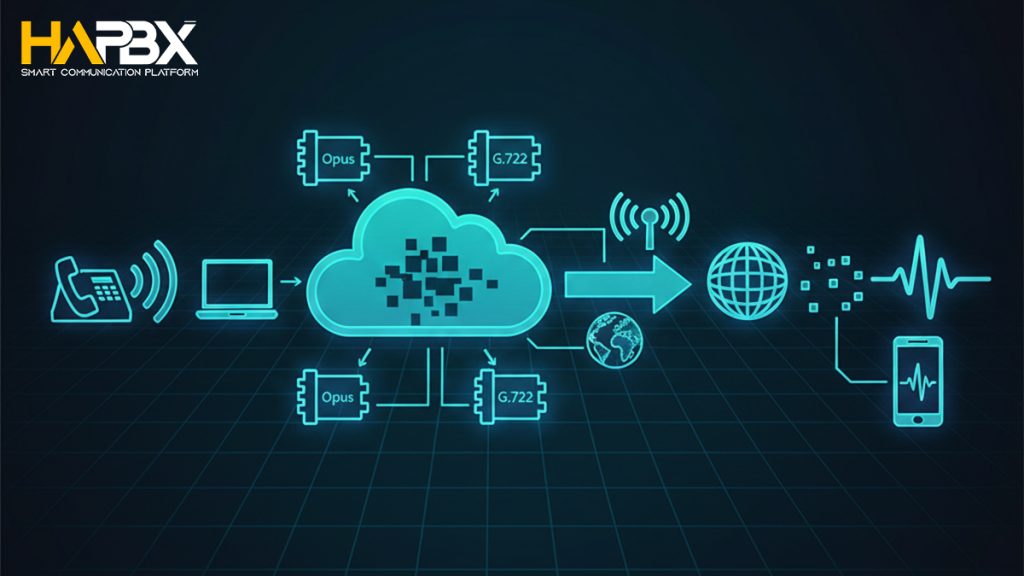
A Virtual PBX works by replacing the analog wiring and on-premise hardware of traditional PBX systems with cloud-based software and VoIP (Voice over Internet Protocol). Instead of transmitting voice through copper landlines, virtual PBX technology converts a speaker’s voice into digital data packets, sends them over the internet, and then converts them back into audio for the recipient.
Here’s how the process works in simple steps:
- Your voice is captured through a phone, computer, or mobile device.
- The system compresses the audio using advanced codecs such as Opus or G.722, which deliver clear, natural-sounding HD voice.
- These compressed audio packets are transmitted over the internet to the receiving party through secure VoIP channels.
- On the other end, the system decompresses the packets and plays them back as high-quality audio.
Because everything happens in the cloud, a Virtual PBX requires no physical switchboards, copper wiring, or hardware maintenance. Users simply connect through an app, browser, or IP phone.
Key Benefits of Virtual PBX
A Virtual PBX delivers all the core capabilities of a business phone system – without the cost, complexity, and limitations of traditional hardware. As cloud communication evolves into UCaaS (Unified Communications as a Service), Virtual PBX solutions now offer flexibility, mobility, and intelligent features designed for modern customer expectations and hybrid work environments.
Below are the most important advantages:
1. Minimal Hardware & Lower Costs
Virtual PBX removes the need for on-site hardware, wiring, and maintenance by running entirely in the cloud. With no equipment to install or repair, businesses avoid depreciation and IT labor costs, making it a far more affordable long-term solution than traditional PBX systems.
2. Fast & Simple Setup
Because Virtual PBX is software-based, businesses can deploy the system within hours – no physical installation required. Adding users or new locations is equally quick, enabling fast expansion and smooth seasonal or multi-office scaling.
3. Scalability Without Limitations
Traditional PBX requires buying hardware and adding wiring to scale. Virtual PBX allows businesses to add or remove users instantly, pay only for what they need, and support multiple devices per user, making it ideal for growing or distributed teams.
4. Flexibility & Mobility for Hybrid Work
Employees can make and receive calls from any device – desk phone, laptop, or mobile app – wherever they work. This mobility supports remote and hybrid teams, ensuring seamless communication from home, the office, or on the go.
5. Superior Voice Quality (HD Audio)
Using advanced codecs like Opus and G.722, Virtual PBX delivers wideband HD audio that is clearer and more natural than the outdated codecs used in traditional landlines. This improves communication quality and reduces misunderstandings.
6. Automatic Updates & Zero Maintenance
All updates, security patches, and maintenance are handled by the provider. Businesses always operate on the latest software without needing IT staff or performing manual upgrades, minimizing operational overhead.
7. Easy Integration With Business Tools
Virtual PBX integrates smoothly with CRM, helpdesk, analytics, and productivity tools. These connections streamline workflows, enhance customer interactions, and centralize data across business applications.
8. Powerful Feature Suite Beyond Calling
Beyond basic calling, Virtual PBX includes IVR, call queues, call recording, voicemail transcription, SMS/MMS, forwarding rules, ring groups, video meetings, and real-time analytics – all within one unified platform.
9. Local Presence & Brand Credibility
Businesses can select local, toll-free, or multiple regional numbers to build credibility and reach new markets. This helps small teams appear more established and improves customer trust.
10. Web-Based Management & Analytics
Admins can manage users, extensions, call flows, and performance metrics through an online dashboard. Built-in analytics provide insights into call volume, agent performance, and customer experience without needing technical expertise.
How a Virtual PBX actually works
Essential features of a Virtual PBX System
A modern Virtual PBX system goes far beyond basic calling. It unifies voice, messaging, mobility, analytics, and automation into one cloud-based communication platform. Below is the complete set of essential features businesses can expect.
1. Multi-Line Business Phone System
A Virtual PBX allows multiple devices – such as a desk phone, smartphone, or laptop softphone – to share the same extension. This multi-line flexibility ensures that users never miss calls, regardless of where they are working. Employees can seamlessly switch between devices and maintain a single business identity across all platforms.
2. Business SMS and MMS
With business texting capabilities, users can send and receive SMS and MMS messages from their business number on any device. This maintains brand consistency when communicating with customers and colleagues, enabling teams to share images, documents, videos, or quick updates directly through their virtual PBX interface.
3. Virtual Receptionist / Auto Attendant (IVR)
A Virtual Receptionist – also known as an auto attendant or IVR – automates call routing to ensure every customer reaches the correct person or department. Businesses can customize menu options, greetings, and routing strategies entirely through the cloud. Advanced IVR systems support speech recognition, DTMF input, and routing methods such as round-robin, skills-based, time-based, or relationship-based routing.
4. Call Flip
Call Flip allows users to switch from one device to another mid-conversation without interrupting the call. For example, a user can move a call from their mobile phone to their desk phone – or vice versa – instantly and seamlessly. This feature is ideal for employees who frequently transition between office, home, and on-the-go environments.
5. Local, International, and Toll-Free Phone Numbers
Virtual PBX systems let businesses choose from a wide selection of local, international, and toll-free numbers. Local numbers help establish a regional presence, international numbers support global operations, and toll-free numbers enhance brand credibility while making it easy for customers to reach the business. Companies can manage number performance easily through the admin dashboard.
6. On-Demand Call Recording
On-demand call recording allows users to instantly record important conversations for future reference, training, or compliance. Recordings are typically encrypted, stored securely, and accessible through desktop or mobile apps. Supervisors can download, share, or search recordings, while businesses may also choose to automate deletion based on retention policies.
7. Visual Voicemail & Voicemail Transcription
Visual voicemail provides text transcripts of audio messages delivered directly to a user’s email or inbox. AI-driven transcription makes messages searchable and easy to prioritize, especially when dealing with high voicemail volumes. Managers can also use call transcriptions for sentiment analysis, coaching, and uncovering common customer concerns.
8. Mobile and Desktop Apps
Most Virtual PBX systems include dedicated mobile and desktop apps that unify calling, messaging, video meetings, voicemail, and notifications in one interface. These apps keep business communications separate from personal calls and ensure users can work from any device while maintaining full access to their phone system functions.
9. Call Forwarding
Call forwarding enables users to route incoming calls to specific extensions, mobile devices, or multiple backup numbers. Forwarding rules can be based on user status – such as “Available,” “Busy,” or “Do Not Disturb.” This ensures uninterrupted communication, even when team members are away from their primary device.
10. Integrations With Business Applications
Virtual PBX platforms integrate seamlessly with CRM tools, helpdesk systems, collaboration apps, and productivity platforms such as Salesforce, HubSpot, Slack, Zendesk, Microsoft 365, Google Workspace, Zapier, and more. These integrations allow users to make calls, sync contacts, track customer interactions, and automate workflows directly inside the apps they already use.
11. Ring Groups
Ring Groups distribute incoming calls to a specific team – such as sales, support, or operations – ensuring faster response times and balanced workloads. Calls can ring all agents simultaneously or follow a pre-set sequence. Ring groups improve first-call resolution and help prevent long queues during busy periods.
12. Call Analytics & Reporting
Virtual PBX systems include robust analytics dashboards that give administrators insight into call activity, agent performance, customer behavior, and service quality. Reports cover metrics such as call volume, dropped calls, average handling time, first-call resolution, audio packet loss, jitter, and overall call quality scores. Threshold-based alerts help managers proactively address performance issues.
Virtual PBX use cases
A Virtual PBX system is highly adaptable and delivers value across a wide range of business models and industries – from small startups to global enterprises, and from healthcare to education and finance. Below are the most common scenarios where Virtual PBX becomes an ideal solution to improve customer experience, boost productivity, and increase revenue.
1. Small Businesses
Small businesses with limited budgets can use Virtual PBX to access professional communication features at a much lower cost than traditional phone systems. As they grow, adding users and features requires no hardware upgrades. Tools like IVR, custom greetings, and ACD help small teams deliver fast, polished customer service and appear more established.
2. Remote and Hybrid Teams
Virtual PBX is ideal for remote and hybrid teams thanks to its mobility. Employees can call, text, join video meetings, and access voicemail from any device. Since the provider manages security and updates, businesses reduce IT burdens. Built-in collaboration tools keep teams aligned across locations and time zones.
3. High Call Volume Businesses
Enterprises with heavy inbound traffic benefit from features like automated callbacks, virtual assistants, and self-service menus that reduce wait times and lighten agent workload. Real-time analytics reveal customer trends and agent performance, while AI-powered forecasting and scheduling streamline workforce management.
4. Global Teams and Distributed Markets
Global companies save significantly with low-cost or unlimited international calling. Virtual PBX also allows businesses to obtain local numbers in various countries, building trust and helping sales and support teams reach customers worldwide without physical offices.
5. Healthcare Organizations
Healthcare providers use Virtual PBX for automated reminders, follow-up messages, and secure patient communication. Many platforms support HIPAA compliance, and integrated video conferencing enables telehealth, remote consultations, and more efficient patient management.

Choose the Right Virtual PBX Provider in 2026
The best Virtual PBX system isn’t simply the one with the most features – it’s the one that aligns with your business needs, workflow, and long-term growth strategy. When evaluating providers, consider the following key elements to ensure you choose a platform that delivers reliability, flexibility, and the right communication capabilities.
1. Reliability and Call Quality
If your business depends heavily on conference calls or customer-facing conversations, audio quality should be a top priority. Look for providers that support modern, wideband codecs such as G.722 and Opus, which deliver crystal-clear HD voice. A reliable provider should also offer strong uptime guarantees, redundant data centers, and robust network stability.
2. Calling Area and Number Options
Organizations with remote teams, hybrid work models, or customers across multiple time zones need flexible number options. Choose a provider that offers:
- Local numbers
- International numbers
- Toll-free numbers
This ensures your team can stay reachable globally and maintain a local presence wherever your customers are based.
3. Advanced Reporting and Analytics
If optimizing agent performance, improving service quality, or diagnosing sales bottlenecks is important, prioritize a PBX system with powerful analytics. Real-time dashboards and historical reports should help you track metrics such as call volume, wait times, dropped calls, customer behavior patterns, and overall communication performance. These insights are critical for making informed operational decisions.
4. Team Collaboration Tools
For businesses that rely on internal coordination, look for platforms that support built-in collaboration features. SMS or internal messaging – often free between users on the same VoIP network – allows teams to communicate quickly without needing third-party apps. Some Virtual PBX providers also include team chat, video meetings, file sharing, or task management tools to streamline collaboration.
5. Integrations With Business Software
If your company uses CRM systems, productivity tools, calendars, or helpdesk software, seamless integration is essential. Choose a Virtual PBX provider that connects easily with platforms like Salesforce, HubSpot, Microsoft 365, Google Workspace, Slack, Zendesk, and similar tools. Integrations eliminate manual work, improve data synchronization, and simplify workflows across departments.
When evaluating your options, consider providers that balance technology, ease of use, and long-term value. HaPBX is designed with this philosophy in mind – offering enterprise-grade call quality, seamless integrations, and flexible plans tailored for growing businesses. If your team needs a reliable Virtual PBX solution built for modern workflows, HaPBX is an excellent place to start.
Why HaPBX is the right choice for your business?
HaPBX is built for businesses that need reliability, performance, and freedom to scale – without the risks of self-hosted VoIP systems.
- True High Availability (HA): HaPBX runs on a Global Cluster Infrastructure, not on customer-managed servers or VMs. This architecture virtually eliminates downtime and keeps your system online even if a node fails.
- Low Latency, Clear Calls: Average latency is maintained around ~50ms and never exceeds 150ms, ensuring smooth, uninterrupted call quality – well above typical VoIP standards.
- Enterprise-Grade Security: Cluster-based separation of data and voice traffic significantly reduces risks commonly associated with self-hosted deployments.
- High Performance & Flexible Scaling: Unlike per-user or per-extension pricing models, HaPBX imposes no limits on extensions, allowing businesses to scale freely. The platform supports 100-200 concurrent calls, ideal for SMBs, enterprises, and call centers.
- Global Stability by Design: With the US cluster as the core operational base and a roadmap for regional expansion, HaPBX delivers consistent performance for global and distributed teams.
FAQs
How many types of PBX are there?
There are three primary types:
- Traditional (Legacy) PBX: Hosted on-site and connected through PSTN landlines.
- Virtual PBX (Cloud PBX): Hosted in the cloud by a service provider.
- SIP Trunking: Allows a legacy PBX to access modern VoIP and cloud-based phone system capabilities.
What is a Cloud PBX? Is it the same as a Hosted PBX or Virtual PBX?
Yes – these terms all refer to the same type of system. Cloud PBX, Hosted PBX, Virtual PBX, and online PBX all describe a private branch exchange delivered via the internet rather than traditional hardware installed on-site.
Can I switch my current business number to a Virtual PBX system?
Yes. Most Virtual PBX providers support number porting, allowing you to transfer your existing business number seamlessly when you sign up. This ensures continuity for customers without needing to change your published contact information.
How does a Virtual PBX phone system work?
A Virtual PBX works entirely over the internet. Instead of routing calls through on-premise hardware, the system uses a cloud-based virtual switchboard to forward incoming calls to the devices or numbers you choose. You can also make outbound calls, send text messages, and manage communications using your virtual business number.
Conclusion
A Virtual PBX system offers modern businesses a smarter, more flexible way to communicate – eliminating the limitations of on-premise hardware while delivering enterprise-grade features at a fraction of the cost. Whether your team is remote, global, rapidly scaling, or simply looking to provide a more professional customer experience, Virtual PBX empowers you to work anywhere, collaborate effortlessly, and stay connected on any device.
From advanced call routing and analytics to seamless integrations and HD voice, Virtual PBX technology is now an essential part of how high-performing organizations operate. Choosing the right provider ensures you not only upgrade your phone system, but also improve productivity, customer satisfaction, and long-term business agility.
HaPBX was built with these priorities in mind. Designed for modern teams, it delivers cloud-based calling, messaging, and collaboration tools in one unified platform – without the complexity or cost of traditional systems. With reliable, high-availability, enterprise-grade Virtual PBX platform built on dedicated infrastructure, fast setup, and plans tailored for growing businesses, HaPBX makes it easy to modernize your communication infrastructure and stay ahead in a digital-first world.
If you’re ready to simplify your phone system and enhance the way your team connects, HaPBX is the ideal Virtual PBX solution to help you move forward with confidence.